Tired of entering your roll number and password every time?
Meet AutoWiFi for College. Sign in with zero friction and stay connected across campus.
AUTOMATIC WIFI LOGIN. EVERY TIME.
Eliminate repetitive captive portal logins. College WiFi Auto Login silently authenticates in the background, switches to your backup account when device limits hit, and reconnects the instant your campus Wi-Fi session drops.
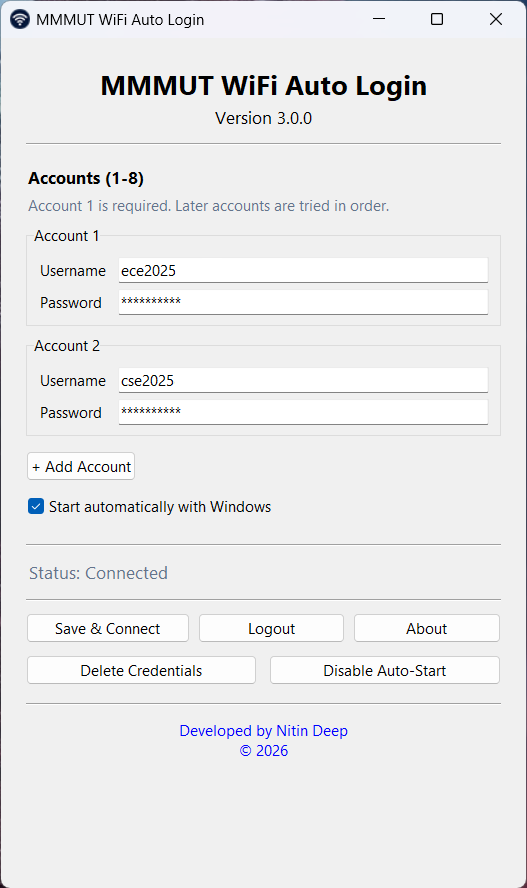
Engineered for campus reliability.
Cyberoam captive portals expire sessions throughout the day. College WiFi Auto Login manages connections quietly without browser tabs.
Automatic reconnection when sessions expire.
Re-authenticates automatically when the Cyberoam portal times out or when your laptop wakes from sleep. Eliminates abrupt disconnects in computer labs, lecture halls, and hostels.
Multi-account smart failover.
When your primary account hits the portal's "Maximum Login Limit Reached" error from an active phone session, the application seamlessly cycles through backup accounts in order.
Boot popup and instant control panel.
A compact boot toast confirms connection in ~4 seconds and auto-closes. Manage up to 8 accounts, toggle Windows auto-start, or trigger instant portal logout anytime.
Local DPAPI Vault
Credentials are saved into Windows Credential Manager (keyring) with user session encryption. No plain-text files.
Netsh Wi-Fi Scanner
Scans visible campus networks and associates with the strongest College access point before initiating portal authentication.
Portal Logout Mode 193
Explicit support for Cyberoam Mode 193 lets you disconnect active sessions cleanly with a single click.
Get started in four steps.
Standard user privileges only. No administrator rights, drivers, or manual registry editing required.
Download
Obtain the verified Windows installer from the direct download button or GitHub releases.
Install
Run College_WiFi_Auto_Login_Setup.exe. Desktop and Startup shortcuts are configured automatically.
Configure
Enter your student credentials once in the client window. Passwords are encrypted in Windows Credential Manager.
Stay Connected
The utility runs quietly in the background, recovering sessions whenever you join campus Wi-Fi.
Your credentials never leave your machine.
College WiFi Auto Login has zero remote telemetry. Every line of Python and Inno Setup configuration is auditable on GitHub.
Local Keyring Storage
Credentials are saved under service College-WIFI-AUTOLOGIN using OS-level encrypted storage.
Zero Remote Telemetry
The desktop client communicates exclusively with local gateway 172.16.1.3:8090 and a standard connectivity check.
Standard User Privileges
Runs entirely within normal Windows user permissions without administrative elevation.